For Windows · Free · Code on GitHub
The right answer, in a low voice, while you present.
Hikui Koe listens to your Meet, Zoom or Teams call, transcribes what the other participants ask and suggests what to answer based on your own documents. One key idea plus 3–5 bullets, readable at a glance.
Windows 10 (2004+) / 11 · Requires Ollama
![Hikui Koe "Live" view: at the top, a participant’s transcribed question about why payments go through a queue; below, the suggested answer with a bold key idea and four bullets, with [X] and [N] placeholders where data is missing.](/_astro/live-en.CA8zHnUv_Hl5Np.png)
How it works
Three steps, without changing how you present.
Load your documents
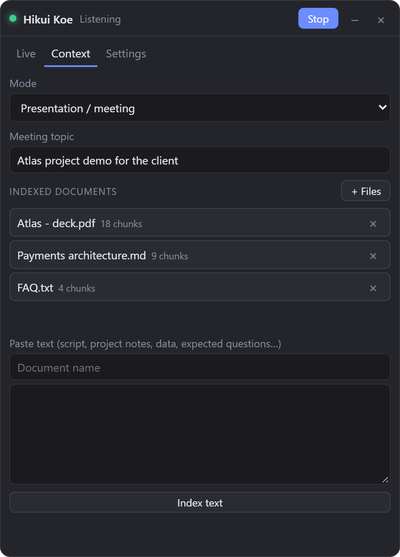
Your deck, project docs, notes or data (text PDF, DOCX, HTML, TXT, MD). They are indexed on your PC.
Listen to the meeting
It captures system audio from Meet, Zoom or Teams and transcribes what the others say. Your microphone is not captured.
Read the suggested answer
It detects the question and gives you a bold key idea plus 3–5 bullets, in first person ("we" when talking about the project).
Features
Built to speak with confidence, not to make up numbers.
Never makes up data
If something is not in your documents, it leaves a placeholder like [X %] or suggests "I’ll confirm and send it to you".
Local or fast cloud
Whisper on your GPU and Ollama for full privacy, or very fast APIs with a free tier (Groq, Cerebras) or any OpenAI-compatible API: first word in under ~2 s.
Invisible when sharing
The window does not show up when you share your screen (Windows 10 2004+), in the taskbar or in Alt+Tab. Adjustable opacity.
Detects questions
It answers on its own when someone asks something. You can also force an answer with Ctrl+Shift+Space or type a question.
Spanish and English
Transcribes and answers in Spanish or English, or detects the language automatically.
Keyboard shortcuts
Everything works without touching the mouse:
- Ctrl+Shift+H
- show/hide
- Ctrl+Shift+L
- listen
- Ctrl+Shift+Space
- answer
- Ctrl+Shift+K
- clear
FAQ
Common questions.
低い声 (hikui koe) means "low voice" in Japanese: someone whispering the answer to you.
Is it free?
Yes, Hikui Koe is free and its code is on GitHub. For answers you can use Ollama locally or APIs with a free tier such as Groq or Cerebras.
What do I need?
Windows 10 (2004 or later) or 11, and Ollama installed with the nomic-embed-text model (ollama pull nomic-embed-text). To generate answers locally, also qwen2.5:7b.
Is it visible when I share my screen?
No. The window is excluded from screen sharing (Windows 10 2004+) and does not appear in the taskbar or Alt+Tab.
Do my documents leave my PC?
No. They are indexed locally with nomic-embed-text embeddings in Ollama. If you use a cloud API, only the transcript and the relevant chunks are sent. With local Whisper and Ollama, everything stays on your PC. API keys are stored encrypted with DPAPI.
Which languages does it understand?
Spanish and English, or automatic language detection.
Does it work on Mac?
No. For now it only runs on Windows.